
How to Manage Your Microsoft Dynamics 365 Storage
How to Manage Your Microsoft Dynamics 365 Storage
Managing CRM storage matters
Microsoft Dynamics 365 Online CRM provides users limited storage space. Much of this storage space will be used for your account records, but you may also be storing old e-mails and/or attachments, audit logs, and activity traces.
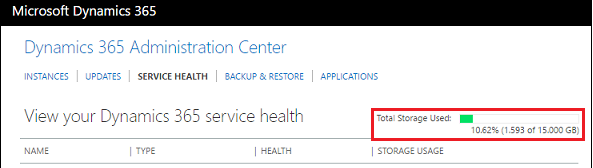
All this can add up. Sometimes, we see users run out of storage space entirely due to poor storage management.
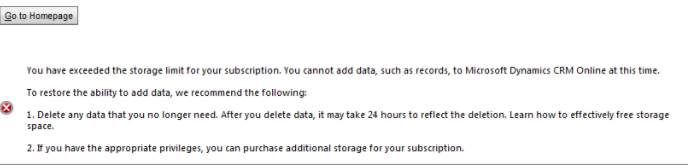
As a result, they may encounter performance issues in Dynamics 365, including warnings, error messages, and poor application performance.
Where can I free up more storage space?
CRM administrators often ask us the best ways to manage their Dynamics 365 storage. We suggest you start by finding and removing some or all of these 7 common records and files that may be using up your valuable storage space:
- Suspended workflows
- Bulk email and workflow instances
- Email messages with attachments
- Notes with attachments
- Bulk duplicate detection jobs and associated copies of duplicate records
- Bulk import instances
- Bulk deletion job instances
We only recommend deleting the activities, attachments, and traces on this list. We do not recommend deleting any core data, such as customers, prospects, cases, opportunities, quotes, orders, etc.
How do I find and remove excess records and files?
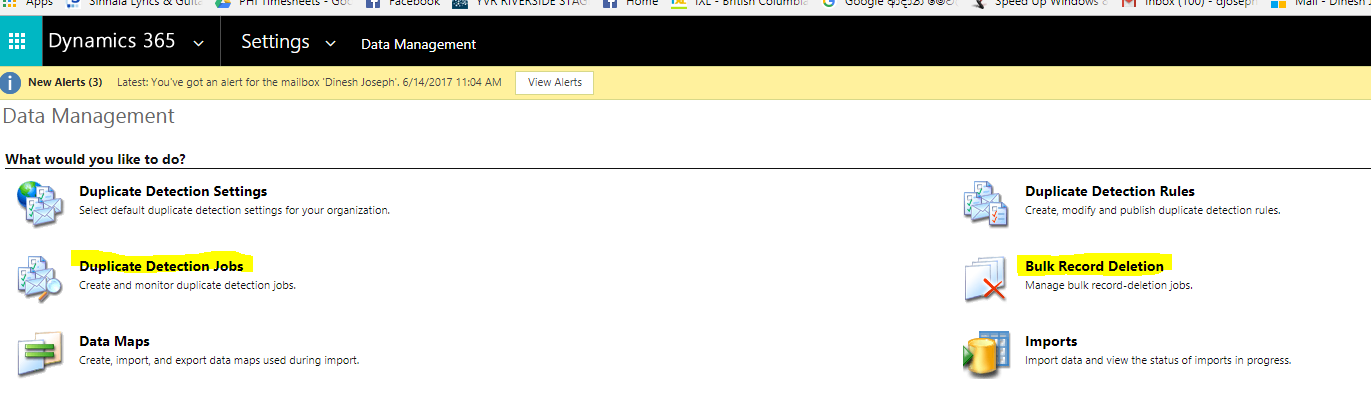
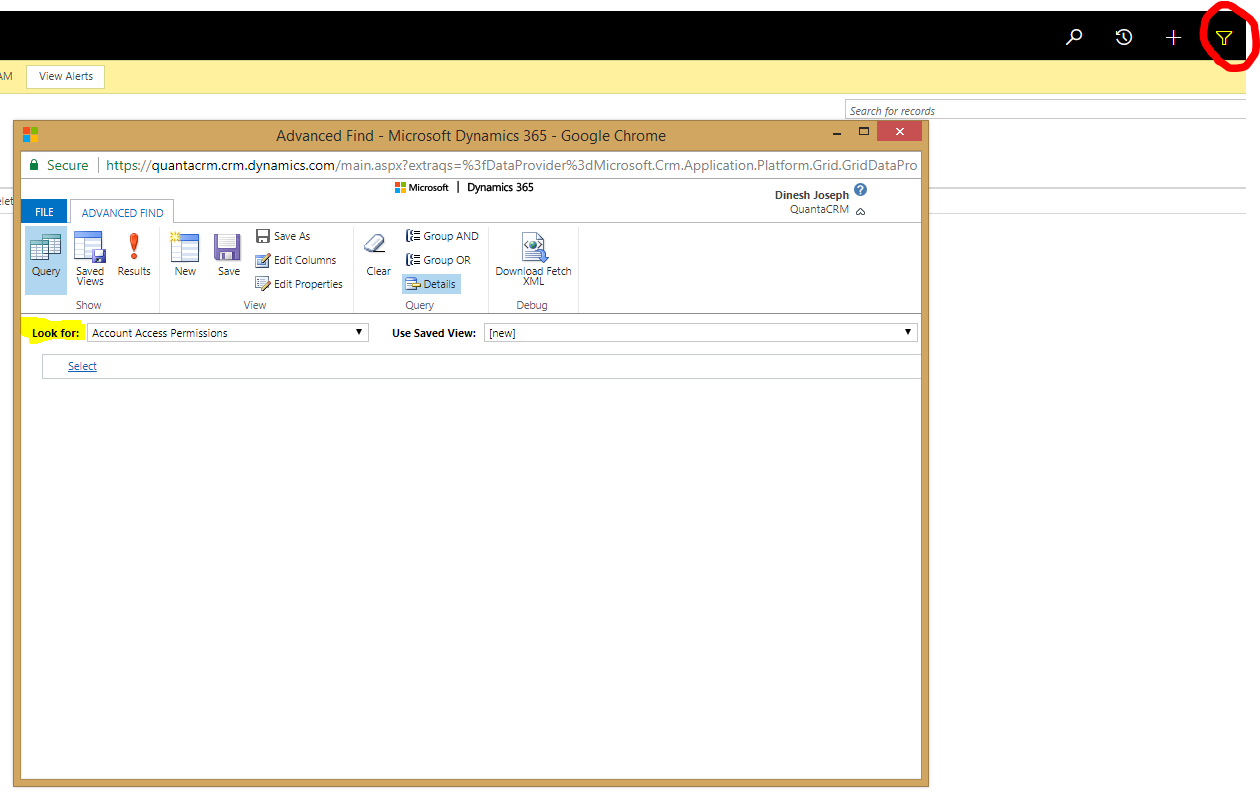
These records can be found and removed using Bulk Record Deletion (bulk email and workflow instances, email and notes with attachments, bulk import instances, bulk deletion job instances), Duplicate Detection Jobs (bulk duplicate detection jobs), and/or Advanced Find (suspended work flows, email and notes with attachments).
You can find Bulk Record Deletion and Duplicate Detection Jobs in Settings → Data Management:
Alternatively, you can start an Advanced Find query by clicking on the icon circled below:
Make CRM Easier To Use With Fewer Clicks: Summer 2026 Release
Chicago, IL – [August 19th, 2026] – If you’ve ever gotten frustrated clicking through CRM just to finish a basic task, you're not alone. After 20+ years in CRM, we still see users lose time moving between screens just to log an activity, send an email, or find what...
Azamba Summer 2026 Release Notes
Enjoy A More Focused, Functional Workspace Release Date: August 19th, 2026 - Tired of a cluttered CRM with too many clicks to get through your day? This release is built to fix exactly that, with powerful upgrades to some of our most-used Add-Ons. Plus, a brand-new...
Azamba Spring Release Notes
Enjoy More Freedom and Flexibility with Your CRM Release Date: March 25th, 2026 - New updates are officially here, the CRM tools you know and love just got smarter. This Spring release focuses on giving you better visibility, easier task management, and a simpler...
Azamba Spring 2026 Add-On Update: Smart Tools That Keep Your Work and Team Connected in CRM
Chicago, IL – [March 25th, 2026] – Does your CRM still feel disconnected from the way you work? Are you left guessing what’s next instead of having clear visibility into pipeline, projects, and follow-ups? After 700+ implementations, we consistently see the same...
Azamba Q4 2025 Release Notes
Smarter, Faster, and Easier Than Ever – CRM That Just Works Release Date: October 29th, 2025 - Your favorite CRM tools just got a serious upgrade. This month’s updates to LaunchPad and the EZ Add-On Suite are focused on saving you time, reducing clicks, and making...
Azamba Q4 2025 Add-On Update: CRM That Works Harder, and Smarter, for You
Chicago, IL – [October 29th, 2025] – It’s here! The October 2025 update is live, and this one’s all about making your CRM easier, faster, and more intuitive than ever. From better automation and faster onboarding to smarter tools that just make sense, this update was...
Azamba Q2 2025 Release Notes
Release Date: July 16, 2025 - At Azamba, we believe your CRM should make work easier, not add unnecessary complexity. Every update in this release is designed to help your team save time, reduce admin, and get more value from Dynamics 365, so you can focus on what...
Azamba Q2 2025 Add-On Update: Everything You Need Now in One Place
Chicago, IL – [July 16th, 2025] – If you’ve ever wished Dynamics 365 could just work the way your team does, you’re not alone. This summer, we’re making it easier than ever to get the most out of your CRM with a single solution, a cleaner workspace, and smarter tools...
Azamba Launches EZ Notes: A Smarter, Simpler Way to Take and Manage Notes in Dynamics 365 CRM
Chicago, IL – [March 19th, 2025] - Are messy, disorganized notes wasting your team’s time and leaving critical details lost in the shuffle? Do you spend more time searching for information than acting on it? EZ Notes is here to end the frustration and take the chaos...
Powerful New Updates to Accelerate Sales for Microsoft Dynamics 365 CRM Users
Chicago, IL – [March 5th, 2025] – Azamba is excited to announce the release of EZ Buttons 3.1. This powerful CRM Add-On for Microsoft Dynamics 365 simplifies tasks and makes CRM a breeze to use. With this CRM Add-On, you will work faster and smarter with less...

Dinesh Joseph is a Microsoft Dynamics and Sage CRM technical consultant at Azamba. He trains, supports, and consults for both new and experienced Dynamics 365 and Sage CRM users. He also provides analysis and customization for both systems and their integrations.
His goal is to help his customers run their CRM systems smoothly and efficiently.
Related articles:
Make CRM Easier To Use With Fewer Clicks: Summer 2026 Release
Chicago, IL – [August 19th, 2026] – If you’ve ever gotten frustrated clicking through CRM just to finish a basic task, you're not alone. After 20+ years in CRM, we still see users lose time moving between screens just to log an activity, send an email, or find what...

Azamba Summer 2026 Release Notes
Enjoy A More Focused, Functional Workspace Release Date: August 19th, 2026 - Tired of a cluttered CRM with too many clicks to get through your day? This release is built to fix exactly that, with powerful upgrades to some of our most-used Add-Ons. Plus, a brand-new...
Make CRM Easier To Use With Fewer Clicks: Summer 2026 Release
Chicago, IL – [August 19th, 2026] – If you’ve ever gotten frustrated clicking through CRM just to finish a basic task, you're not alone. After 20+ years in CRM, we still see users lose time moving between screens just to log an activity, send an email, or find what...
Azamba Summer 2026 Release Notes
Enjoy A More Focused, Functional Workspace Release Date: August 19th, 2026 - Tired of a cluttered CRM with too many clicks to get through your day? This release is built to fix exactly that, with powerful upgrades to some of our most-used Add-Ons. Plus, a brand-new...